

Does the RYSE SmartShade Work With SmartThings? Z-Wave Pairing, Explained

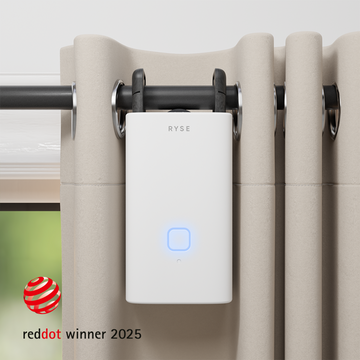
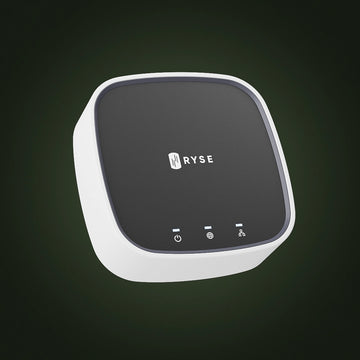
Short answer: yes. The RYSE SmartShade works with Samsung SmartThings, and it does it through a dedicated accessory called the Z-Wave Adapter ($59.99). Plug the adapter into the bottom of your SmartShade and the motor becomes a Z-Wave device your hub can see, control, and build automations around.
If you already own a Z-Wave certified hub, this is the path you want. If you do not, you probably do not need the adapter at all. Here is how to tell the difference.
Why the Z-Wave Question Matters
Most people shopping for smart shades already have a hub of some kind. The frustrating part is that a lot of motorized shade products lock you into their own app and their own ecosystem, which means one more silo in a home that already has too many.
RYSE takes the retrofit approach instead. The SmartShade clips onto the beaded chain of the roller, zebra, or solar shade you already own, with no mandatory drilling, no electrician, and no replacing the shade itself. The Z-Wave Adapter extends that same idea to your hub: keep the shades you have, keep the hub you have, and let them talk to each other.
What You Need to Pair With SmartThings
According to the RYSE support documentation, pairing a SmartShade with SmartThings requires three things:
- A RYSE SmartShade, either Wired ($149.99) or Wire-Free ($199.99).
- The Z-Wave Adapter ($59.99).
- A SmartThings Hub, with the SmartThings app on your phone.
Z-Wave Adapter vs SmartBridge: Which One Do You Need?
This is the most common point of confusion, so it is worth laying out side by side. The two accessories are completely separate devices. They do not connect to each other, and neither one is required for the other to work.
| Z-Wave Adapter ($59.99) | SmartBridge ($49.99) | |
|---|---|---|
| What it does | Makes the SmartShade a Z-Wave device on your existing hub | Connects the SmartShade to your Wi-Fi network |
| Best for | Homes that already run a Z-Wave certified hub | Homes with no hub that want voice control and schedules |
| Works with | Z-Wave certified hubs, including SmartThings and Homey | Alexa, Google Assistant, Apple HomeKit, remote access, routines and schedules |
| Compatible products | SmartShade only, Wired or Wire-Free | SmartShade and SmartCurtain |
| Required for the other? | No | No |
One important limitation: the Z-Wave Adapter is compatible with RYSE SmartShades only. It does not work with the SmartCurtain. If your windows use rod curtains rather than beaded-chain shades, the SmartCurtain plus a SmartBridge is the setup to look at.
How the Pairing Actually Works
RYSE uses Z-Wave secure inclusion, which means pairing involves the QR code printed on the adapter rather than a blind search for nearby devices. The support article walks through it in full, but the shape of it is:
- Plug the Z-Wave Adapter into the bottom of the SmartShade, then connect the power source (BatteryPack or RYSE Power Adapter).
- Install the SmartShade on your beaded chain and calibrate the top and bottom positions.
- In the SmartThings app, tap the plus icon, choose Add a Device, then Scan QR Code. Stay near your hub for the best results.
- Unplug the power source, scan the code on the bottom of the adapter, then plug power back in.
- Press the PAIR button on top of the SmartShade. It blinks blue to show it has entered pairing mode.
- Name the device and tap Done. SmartThings downloads the required plugins on its own.
If you cannot physically reach the shade to scan the code, RYSE documents an alternate pairing method that skips the QR step. For the full steps and screenshots, see the support guide: Pairing RYSE SmartShade with SmartThings using the Z-Wave Adapter.
Key Benefits
- Multiple control methods at once. With the adapter installed, the SmartShade can be paired to a Z-Wave hub, the RYSE app (via Bluetooth or SmartBridge), and Bluetooth accessories like the Remote Control at the same time.
- The RYSE app stays optional. Pairing with the app is not required for Z-Wave setup, though the app includes an interactive install guide that makes first-time setup smoother.
- No hub swap. Keep the Z-Wave certified hub you already trust, including SmartThings and Homey.
- Still a retrofit. Your existing shades stay on the window. Nothing gets replaced and nothing gets drilled.
- Works wired or wire-free. Both SmartShade configurations support the adapter.
Why RYSE Is a Top Choice for a Z-Wave Home
The appeal of a Z-Wave home is local, reliable control that does not depend on any single company's cloud. RYSE fits that philosophy well: the hardware attaches to the window coverings you already own, the adapter speaks your hub's native language, and you are not forced to abandon either your shades or your automation platform to get motorized light control.
Start with the SmartShade, add the Z-Wave Adapter if you run a Z-Wave hub, and add the SmartBridge if you also want voice assistants and scheduled routines. They are independent choices, and you can add either one later.
Share with your community!
In this article
Sign up for our newsletter
Latest from experts

Automate Light for Your Houseplants: Smart Shade Routines for Fall and Winter

The Daylight Handoff: How Smart Shades and Smart Lights Can Take Turns Through the Day
